Tag: conversion rate optimization

  • A Guide to Landing Pages Conversion

    A Guide to Landing Pages Conversion

    It’s an old saying, but it holds true: you can’t improve what you don’t measure. Before you can boost your landing page conversion rates, you need an honest, clear-eyed look at where you’re starting from. This means establishing your baseline metrics.

    How To Measure Your Current Conversion Performance

    A person analyzing charts and graphs on a computer screen, representing performance measurement for landing pages conversion.

    Before you touch a single headline or button, you have to build a solid foundation of data. I’ve seen so many teams jump straight into A/B testing without understanding their current performance, and it’s a lot like trying to find a destination without a map. Sure, you’re moving, but you have no real direction. The whole point here is to establish a reliable baseline so you can actually track the impact of your changes down the line.

    The first, and most critical, step in this whole optimization journey is implementing robust effective website conversion tracking. This usually means getting tools like Google Analytics set up correctly to monitor user actions, making sure every click, form submission, and purchase is actually being counted. Get this part right, and everything else becomes easier.

    Understanding Industry Benchmarks

    It’s always helpful to know what a “good” conversion rate even looks like. While your own historical data is the ultimate benchmark, industry figures give you some much-needed context. They can quickly tell you if your performance is about average, lagging behind, or genuinely leading the pack.

    Here’s a quick look at some recent data to give you a feel for where the market is.

    Industry Median Conversion Rate Benchmarks

    This table breaks down the median conversion rates across different industries, giving you a reference point to see how your own numbers stack up.

    Category Median Conversion Rate
    All Industries (Overall) 6.6%
    Business-to-Consumer (B2C) 9.87%
    Business-to-Business (B2B) 13.28%

    These figures, which come from a massive analysis of over 41,000 pages, are a solid starting point for setting realistic goals for your own campaigns.

    A quick word of caution: A benchmark is a point of reference, not a hard-and-fast rule. Your main goal should always be continuous improvement against your own baseline, not just chasing an industry average that might not even apply to your unique audience or offer.

    Key Performance Indicators Beyond Conversion Rate

    Focusing only on the final conversion rate can be a bit misleading. To get the full picture, you need to look at several connected Key Performance Indicators (KPIs) that start to reveal the why behind your numbers. A low conversion rate is often just a symptom of a different problem.

    Here are the essential metrics I always recommend tracking for landing pages:

    • Conversion Rate: This is the big one—the percentage of visitors who complete your goal (sign up, buy something, download a file). It’s your primary success metric.
    • Bounce Rate: This is the percentage of people who land on your page and leave without doing anything else. A high bounce rate is a huge red flag that there’s a disconnect between your ad and your page.
    • Time on Page: How long do people actually stick around? Longer times can mean they’re engaged, while super short visits might signal they’re confused or just not interested.
    • Cost Per Acquisition (CPA): How much are you spending to get one customer or lead? This metric is crucial because it ties your marketing spend directly to your results and profitability.
    • Lead Quality: For B2B, this is a biggie. Don’t just track the number of leads. You need to know how many of them turn into sales-qualified leads to understand your true ROI.

    Setting Up Your Performance Dashboard

    Once you know which KPIs matter, pull them all together into a performance dashboard. Whether you use Google Analytics 4 (GA4) or another analytics platform, you can create a custom report that puts all your essential metrics in one spot.

    Start by setting up conversion goals in GA4 for your main call to action, like a form submission or a “thank you” page view. This lets the platform automatically calculate your conversion rate. I also highly recommend creating custom segments to analyze traffic from different sources (like organic search vs. paid ads) to see which channels are sending you the best visitors.

    This dashboard will become your single source of truth for every optimization effort you make. For a deeper dive into improving these numbers, you can check out our other articles on conversion rates.

    Fine-Tuning the User Experience and Page Speed

    A person using a tablet to interact with a visually clean and fast-loading landing page, symbolizing an excellent user experience.

    You can write the most brilliant copy in the world and have an offer that’s an absolute no-brainer, but none of it matters if your landing page is slow, clunky, or just plain confusing. If a visitor lands on your page and it’s a pain to use, they’re gone. Simple as that.

    Think of it this way: every moment of confusion, every extra second of load time—it’s all friction. And friction is the mortal enemy of a high conversion rate. When someone clicks your ad, they’re expecting a quick, clear answer to their problem. A slow, frustrating page breaks that promise right out of the gate. That’s why tweaking your UX and page speed isn’t just a job for your developer; it’s a core part of your conversion strategy.

    Speed Is Not a Feature; It’s a Requirement

    We live in an era of instant gratification, and your landing page is no exception. We’ve all been there—clicking a link, staring at a blank screen, and getting more impatient with every passing millisecond. Most people won’t wait. They’ll just hit the back button and find a competitor whose site actually works.

    The numbers here are staggering. Research consistently shows that pages loading in just one second can achieve conversion rates up to five times higher than those that take a sluggish 10 seconds to appear. Even a seemingly small jump from a five-second load time to one second can triple your conversions. The message is clear: speed sells.

    Here are a few things you can do right now to speed things up:

    • Shrink your images. This is the low-hanging fruit. Huge, unoptimized images are almost always the biggest culprit behind slow pages. Use a tool like TinyPNG to compress them without losing visual quality.
    • Audit your scripts. Every little script you add for analytics, heatmaps, or chat widgets adds to the load time. Take a hard look at what you’re running and cut anything that isn’t absolutely essential for this specific page.
    • Use browser caching. Caching tells a visitor’s browser to save static elements—like your logo, fonts, and stylesheets—so the page loads almost instantly on their next visit.

    Build for Thumbs, Not Cursors

    It’s no secret that mobile traffic dominates the web, yet so many landing pages still feel like they were built exclusively for a giant desktop monitor. This is a huge, costly mistake. A design that looks beautiful on your screen can quickly become a user’s nightmare on a phone, with text so small you have to squint and buttons that are impossible to tap accurately.

    Your goal isn’t just a “mobile-friendly” page; it’s a mobile-first experience. This means the most important stuff—your headline, your core promise, and your call-to-action—should be front and center without any need for pinching, zooming, or scrolling.

    My Two Cents: Don’t just trust your browser’s mobile simulator. Test your page on real devices. Grab an iPhone, find an Android phone, and see how it actually feels to use. You’ll be shocked at the little usability headaches you uncover that the emulators completely miss.

    One Page, One Goal: Remove the Escape Routes

    A great landing page has one job and one job only: to get the visitor to take that one specific action. One of the most common mistakes I see is giving people too many choices. Pages cluttered with full navigation menus, links to social media profiles, and links to other “special offers” are conversion killers.

    Every single one of those extra links is an escape hatch. It’s a shiny object pulling your visitor’s attention away from the one thing you want them to do.

    A truly optimized landing page should have no main navigation. The only clickable elements should guide the user toward the conversion goal. This “one page, one purpose” philosophy keeps them focused and moving down the path you’ve laid out for them, which dramatically increases the odds they’ll actually get to the end.

    If you want to dive deeper into getting these on-page elements just right, check out our other articles on user experience. By eliminating distractions and making your page blazing fast, you create a smooth, frictionless journey from their first click to your next conversion.

    Writing Copy That Converts

    A person writing at a desk with lightbulbs overhead, symbolizing the creation of high-converting copy for landing pages.

    While a fast, beautiful page sets the stage, your words do the heavy lifting. The copy is what ultimately convinces someone to take action, turning their passive interest into a decisive click. I’ve seen bad copy sink perfectly designed pages, while great copy can make even a simple design incredibly effective.

    Think of your copy as your best salesperson. It needs to grab attention instantly, build rapport, handle objections, and clearly ask for the sale. Every single word has to earn its spot on the page, guiding the visitor one step closer to your goal. This isn’t about being clever or using fancy language; it’s about using the right language to connect with your audience’s real needs.

    Your Headline Must Do One Job Perfectly

    The headline is your first—and often, your only—chance to make an impression. It’s a harsh reality, but about 8 out of 10 people will read your headline, while only 2 out of 10 will bother with the rest. Its one and only job is to hook them and convince them the rest of the page is worth their time.

    A high-converting headline isn’t just clever; it’s crystal clear. It has to instantly communicate the biggest benefit of what you’re offering. Ditch the vague promises and get straight to the tangible outcomes.

    Let’s walk through a real-world scenario. Say you’re offering project management software for small teams.

    • Weak Headline: The Future of Team Collaboration (This is just fluff. It says nothing.)
    • Strong Headline: Stop Juggling Tabs and Finish Projects On Time (This is specific, hits on a known pain point, and promises a clear benefit.)

    The second headline works because it enters the conversation already happening in the prospect’s head. It pinpoints a common frustration—”juggling tabs”—and immediately presents a desirable solution.

    Crafting Body Copy That Resonates

    Once the headline gets them to stick around, your body copy has to deliver on that initial promise. This is where you connect your solution directly to the visitor’s problems. The biggest mistake I see brands make is talking endlessly about themselves and their product’s features. Here’s a tough truth: your visitors don’t care about your features. They care about what those features can do for them.

    Always write from the customer’s perspective. Frame every feature as a direct benefit that solves a problem or helps them achieve a goal. Instead of saying, “Our software has a real-time analytics dashboard,” try, “See exactly which tasks are falling behind in real-time so nothing gets missed.”

    To make your copy more compelling and just plain easier to read, keep these tips in your back pocket:

    • Use short paragraphs. Break your text into small, digestible chunks of one to three sentences. This creates white space and makes the page feel less intimidating to scan.
    • Speak their language. Drop the industry jargon and corporate-speak. Write as if you were explaining your solution to a friend over coffee. It builds trust and makes your message stick.
    • Focus on the “what’s in it for me?” For every single point you make, ask yourself why the reader should care. The answer is the benefit you need to highlight.

    The Irresistible Call to Action

    Your Call to Action (CTA) is the final, crucial step. It’s the moment of truth. A weak, uninspired CTA can bring your entire conversion funnel to a screeching halt. The goal is to make the action feel both urgent and valuable.

    Believe it or not, the text on your button matters far more than its color. Generic words like “Submit” or “Click Here” create hesitation because they don’t tell the user what they get in return. Instead, use action-oriented, benefit-driven language.

    Here’s a simple side-by-side:

    Weak CTA Strong CTA
    Submit Get My Free Guide
    Sign Up Start My 14-Day Trial
    Download Download the Checklist Now

    Notice how the strong examples complete the sentence “I want to…” from the user’s point of view. They are specific and reinforce the value they’re about to receive.

    Finally, don’t forget the microcopy right around your form and CTA. This is the small, reassuring text that eases anxiety. Simple phrases like “We’ll never share your email” or “No credit card required” can do wonders for building confidence and nudging that conversion rate upward.

    Earning Their Trust with Social Proof

    Let’s be honest. Even with a brilliant offer and a beautiful landing page, most first-time visitors are skeptical. They’ve been burned before. Before they even think about giving you an email address, let alone a credit card number, you have to prove you’re the real deal.

    This is where social proof comes in. It’s a simple psychological concept: people trust other people. When a potential customer sees that others just like them have already had a great experience with you, their defenses come down. Think of it like walking past a restaurant with a line out the door—you instantly assume the food must be worth the wait.

    Authentic Testimonials Are Your Secret Weapon

    The most common and effective form of social proof is a customer testimonial. But its power is directly tied to how authentic it feels. A vague, overly polished quote can scream “fake” and backfire completely.

    The best testimonials tell a story and focus on a tangible result. They don’t just say your product is “great,” they show how it solved a real-world problem. Whenever you can, pair the quote with a real name, title, and a headshot. It makes the person and their story feel so much more real.

    • What to avoid: “We love this software. It’s awesome!”
    • What to aim for: “We were wasting 10 hours a week on manual data entry. Now, it’s completely automated. That’s a full workday we get back every single week.” – Jane Doe, Operations Manager, Acme Corp.

    See the difference? The second one has a clear “before and after” and a specific, valuable outcome. That’s what resonates with new visitors who are hoping for a similar result.

    More Than Just a Good Quote

    While testimonials are a great start, don’t stop there. Different people are persuaded by different things. Some connect with a personal story, while others are more impressed by cold, hard data or a stamp of approval from a brand they recognize.

    Try sprinkling a few of these throughout your landing page:

    • Case Studies: A full case study can be a lot to read, but you can pull out the most powerful stat. A simple line like “Helped one client increase their conversion rate by 45%” can be incredibly compelling.
    • User Reviews & Ratings: Got great reviews on G2, Capterra, or Trustpilot? Star ratings are an immediate visual cue for quality. Flaunt them.
    • Customer Logos: If you’ve worked with well-known companies, their logos can do the talking for you. It’s a form of borrowed credibility that says, “If these big players trust us, you can, too.”
    • Press Mentions: Being featured in a respected publication is a powerful endorsement. Adding logos from places you’ve been mentioned builds instant authority.

    The trick is to be strategic about placement. A powerful testimonial right next to your call-to-action button can be the final nudge someone needs. Similarly, a few security badges near a payment form can quiet those last-minute jitters.

    Don’t Forget Security and Trust Badges

    Never, ever underestimate the calming effect of a small, recognizable icon, especially when you’re asking for sensitive information. These little badges are mental shortcuts that reassure visitors their data is safe and your business is legitimate.

    Where you put them matters.

    Type of Badge Best Placement What It Says
    Payment Logos Near checkout or payment fields. “We accept these trusted payment methods.”
    Security Seals Near any form asking for personal info. “Your connection is secure and your data is safe.”
    Industry Awards In an “As Seen On” section or page footer. “We’re recognized by our peers as a leader.”

    By layering these different types of social proof, you build a powerful case for trust. You stop telling visitors how great your solution is and start showing them that plenty of other people already agree. That validation is often the final piece of the puzzle that turns a hesitant browser into your next happy customer.

    Running A/B Tests That Actually Work

    A split-screen view showing two different versions of a landing page, 'A' and 'B', illustrating the concept of A/B testing.

    You can tweak your copy, obsess over page speed, and load up on testimonials, but eventually, the easy wins dry up. This is where the real, needle-moving work starts. To get past that plateau and keep boosting your landing pages conversion rates, you have to stop guessing and start making data-driven decisions.

    This is exactly what A/B testing (or split testing) is for. It’s a beautifully simple idea: you create two versions of your page—the original “control” and a new “variation”—show them to different groups of visitors, and see which one performs better. It’s the ultimate way to let your audience vote with their clicks, taking ego and guesswork completely out of the equation.

    Forming a Strong Hypothesis

    A great test never kicks off with a random thought like, “I wonder if a green button would work better.” That’s just throwing spaghetti at the wall. Every meaningful test starts with a solid, testable hypothesis that’s rooted in something you’ve observed about your users. Honestly, this is the most critical part of the whole process, and it’s where most people go wrong.

    Your hypothesis should be built on an observation, proposing a specific change you believe will lead to a measurable outcome. The best clues are hiding in the data you’re already collecting.

    • Analytics Data: Seeing a massive drop-off right at your contact form? Your hypothesis might be: “By cutting the number of form fields from seven to three, we’ll reduce user friction and see more submissions because people are getting overwhelmed.”
    • User Feedback: Are your support chats constantly answering the same question about your pricing? You could form this hypothesis: “By adding a small FAQ section right under the pricing table, we can clear up common doubts and increase sign-ups because we’re proactively addressing user uncertainty.”

    See the structure? “By changing X to Y, we will achieve Z because of B.” This simple formula forces you to justify why you think a change will work, which leads to much smarter experiments.

    What to Test for the Biggest Impact

    When you’re just starting, it’s so tempting to test tiny things like button colors or font styles. And while those can make a difference, they rarely deliver game-changing results. If you want to see a significant lift in your landing pages conversion metrics, you have to think bigger.

    Focus your energy on the elements with the most potential impact first. I always recommend starting with these heavy hitters:

    1. Your Headline and Value Proposition: This is the first thing people read. A completely different headline that targets a new pain point can have a massive effect on whether they stay or bounce.
    2. Your Call to Action (CTA): Go beyond just the color and test the actual words. “Get My Free Template” feels very different from “Download Now,” and that difference can dramatically change your click-through rates.
    3. Page Layout and Flow: Sometimes the entire structure is the problem. Try testing a radically different layout. What happens if you move your social proof above the fold? Or pit a single-column design against your current two-column setup?
    4. The Offer Itself: This is a more advanced tactic, but it can produce the biggest wins. Could a free trial outperform a demo? Is a 20% discount more compelling than a free e-book? Testing the core offer gets to the heart of what your audience truly wants.

    A classic rookie mistake is testing too many things at once. If you change the headline, the main image, and the CTA all in one variation, you’ll have no idea which change was responsible for the win (or loss). Always test one variable at a time.

    Tools and Statistical Significance

    To actually run these tests, you’ll need a bit of help from technology. Platforms like Google Optimize (which is now part of Google Analytics 4), VWO, or Optimizely are designed for this. They handle the technical part of splitting your traffic and tracking the results so you can focus on the strategy.

    Finally, be patient. You can’t declare a winner after just a few hours. You have to let your test run long enough to reach statistical significance—a fancy term for making sure your results aren’t just a fluke. Most tools will calculate this for you, and you’re generally looking for a 95% confidence level. This gives you the confidence that when you implement the winning version, it will actually perform better for all your future visitors.

    Using Notification Bars to Boost Conversions

    Once you’ve tightened up the core elements of your page, you can layer on dynamic tools to grab attention and nudge visitors toward action. One of the most effective—and subtle—ways to do this is with a notification bar. Think of it as a smart, timely message that boosts your landing page’s conversion rate without getting in the user’s way.

    A great tool for this is LoudBar. It lets you add an eye-catching, non-intrusive banner that can reinforce your main offer or flash a special deal. But here’s the key: instead of just sitting there, these bars pop up based on what a visitor is doing, making the message feel incredibly personal and timely.

    Setting Up Your First Bar

    Getting one up and running is surprisingly simple. First, you’ll pick a style that matches your brand’s vibe. You can go for something clean and classic or choose a more animated look. The idea is to catch the eye without clashing with the rest of your page design.

    The real magic, though, is in the triggers. Imagine setting up a bar that only appears when a visitor shows exit intent—that classic moment they move their cursor to leave the page. This is your golden opportunity to hit them with a last-chance offer, maybe a 10% discount code, to stop them from bouncing.

    Here’s a quick look at how a LoudBar notification appears on a live site.
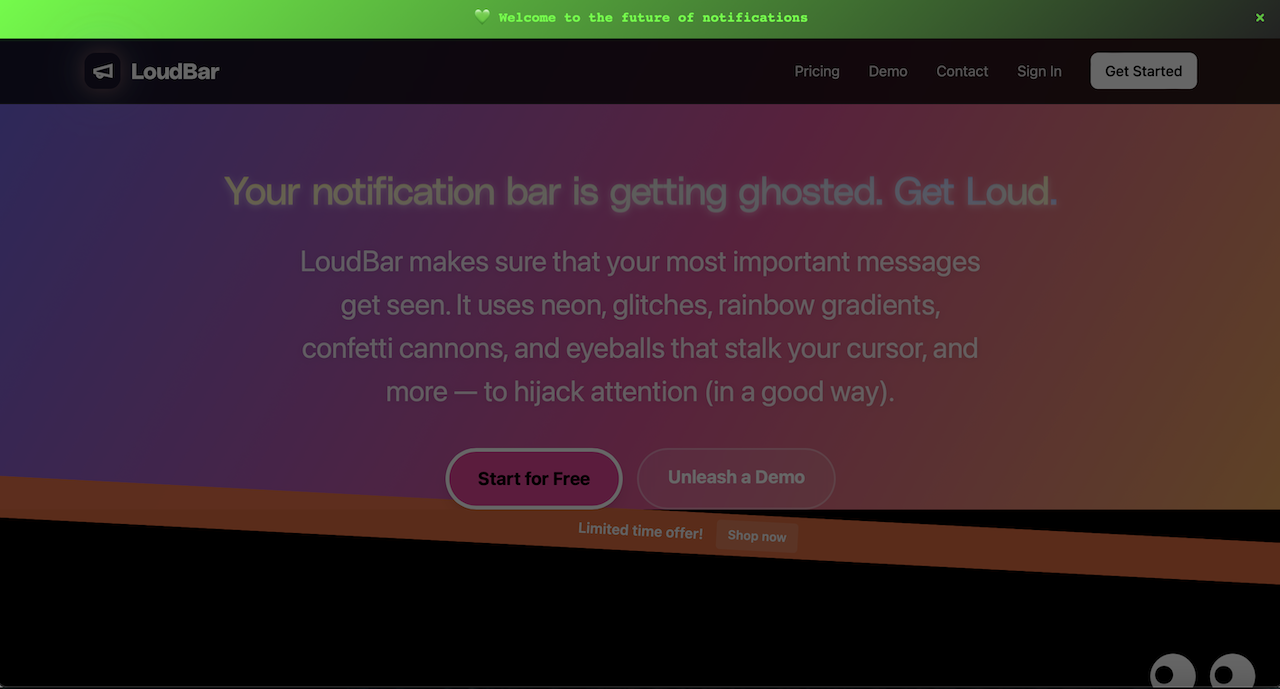
    See how it sits cleanly at the top? It delivers a punchy message without blocking the content your visitor came to see.

    Practical Triggers for Higher Conversions

    The difference between a notification bar that works and one that gets ignored comes down to two things: timing and relevance. A generic message blasted to every single visitor is just digital noise.

    A well-timed notification acts as a helpful nudge, not an annoying interruption. By aligning your message with user behavior, you can significantly increase the chances of a visitor taking your desired action.

    Let’s look at a couple of real-world scenarios:

    • Time-on-Page Trigger: A visitor has been lingering on your pricing page for more than 30 seconds. They’re clearly thinking it over. This is the perfect moment to trigger a bar offering a free consultation or linking to a detailed case study that seals the deal.
    • New Visitor Welcome: For someone visiting your site for the very first time, why not roll out the red carpet? Show them a bar with a special introductory offer to make a great first impression and encourage that all-important first conversion.

    For each trigger, you’ll want to customize the message and call-to-action. Once it’s live, the final step is to watch the numbers. Tracking click-through rates on your bars tells you exactly how they’re impacting your overall landing page conversion goals, so you can keep tweaking your approach.

    For more hands-on ideas, check out our in-depth guides on notification bar customization.

    Your Top Landing Page Conversion Questions, Answered

    When you dive into landing page optimization, a few common questions always seem to pop up. Let’s tackle them head-on.

    Lots of marketers feel stuck on where to even begin. With so many variables—headlines, images, copy, CTAs—it’s easy to get analysis paralysis. If you’re looking for the single change that will give you the most bang for your buck, start with your headline. A powerful, benefit-driven headline is almost always the highest-impact element you can test.

    Another big one is page length. Long-form or short-form? The honest answer is: it depends. There’s no magic number. It all comes down to the complexity of what you’re offering and how much your audience already knows. A simple free checklist needs way less convincing than a complex, high-ticket B2B software.

    My rule of thumb is this: your landing page should be as long as it needs to be to answer every question and squash every objection, but not a single word longer.

    How Many Form Fields Is Too Many?

    Ah, the eternal debate over form fields. Everyone knows that fewer fields generally mean higher landing pages conversion rates. But just slashing fields isn’t always the smart move for the business.

    Sometimes, asking for more information—like company size or job title—can weed out unqualified leads. Sure, your overall conversion rate might dip, but the quality of the leads you do get could skyrocket.

    It’s all about finding that sweet spot between quantity and quality. Before you decide, think about:

    • Your Goal: Are you playing a volume game, trying to get as many leads as possible? Or are you hunting for a smaller list of highly-qualified prospects?
    • The Value Exchange: People will part with more information for a high-value offer, like a one-on-one demo, than they will for a basic newsletter signup. Make sure the “ask” matches the “get.”

    If you’re looking for more practical strategies to solve these kinds of challenges, this guide on 8 Landing Page Optimization Tips for Conversions in 2025 is a great next step. At the end of the day, the only way to find what truly works is to test, test, and test again with your own audience.


    Ready to make your most important messages impossible to ignore? LoudBar helps you create attention-grabbing notification bars that boost clicks and conversions. Start turning fleeting attention into action today. Get started with LoudBar for free!
  • How to Increase Website Conversion Rate: A Practical Guide

    How to Increase Website Conversion Rate: A Practical Guide

    Boosting your website’s conversion rate isn’t about guesswork or randomly changing button colors. It’s a methodical process that starts with a deep dive into your data to truly understand what your visitors are doing, where they’re getting stuck, and why. From there, it’s all about forming smart hypotheses, testing changes, and scaling what actually works.

    Your Starting Point: The Foundational CRO Audit

    A person analyzing charts and graphs on a computer screen, representing a website audit.

    Before you can fix anything, you have to know what’s broken. Jumping straight into A/B testing without a clear baseline is like trying to navigate a new city without a map—you’ll be moving, but probably not in the right direction. A proper CRO audit is about gathering objective data to see your website through your users’ eyes.

    This isn’t the time for assumptions. You need to become a digital detective. Your mission is to uncover precisely where potential customers get frustrated, confused, or just give up. By blending hard numbers with real human behavior, you can build a complete picture of your site’s performance and zero in on the biggest opportunities.

    Digging into the “What” with Quantitative Analytics

    Your first stop should always be your analytics platform, which for most of us is Google Analytics. This is where you find the “what” of user behavior. Forget vanity metrics like total traffic for a moment and focus on the data points that scream “friction!”

    Start by dissecting these key reports:

    • Funnel Visualization: This is your bread and butter. Map out the critical steps a user takes to convert, whether it’s an e-commerce checkout or a B2B lead form. This report will show you the exact pages where you’re losing the most people. A 90% drop-off between the cart and payment pages? That’s not just a leak; it’s a firehose.
    • Landing Page Performance: Take a hard look at your top landing pages. Sort them by bounce rate or, even better, by their abysmal conversion rates. A high-traffic page that isn’t converting is a goldmine for optimization. A blog post pulling in thousands of visitors with zero conversions likely has a weak call-to-action (CTA) or a design that hides the next step.
    • New vs. Returning Users: Segmenting your audience is crucial. How do first-timers behave compared to your loyal fans? If returning users convert at a much higher rate, it’s a strong signal that new visitors aren’t grasping your value proposition right away.

    A quantitative audit is fantastic for identifying the problem areas. It tells you where users are bouncing, but it can’t tell you why. For that, you need to see things from their perspective.

    Uncovering the “Why” with User Behavior Tools

    Once you know where the problems are, it’s time to figure out why they’re happening. This requires tools that show you how people actually interact with your pages. These insights are what separate good CRO from great CRO—they add the human story behind the numbers.

    Two types of tools are absolute game-changers here:

    Heatmaps: Tools like Hotjar or Crazy Egg create a visual overlay on your site showing where users click, move their mouse, and scroll. A heatmap might instantly reveal that dozens of users are clicking on a non-clickable image, signaling a major UX flaw. Or, it could show that your primary CTA is “below the fold,” where almost no one ever scrolls.

    Session Recordings: Think of these as a DVR for your user’s journey. Watching a few recordings of a problematic page can be one of the most humbling and eye-opening experiences in marketing. You’ll see users rage-clicking a broken button, struggling to find the right field in a form, or just looking completely lost. This firsthand evidence is invaluable for building empathy and generating powerful test ideas. You can dig deeper into interpreting these patterns by exploring other resources on improving conversion rates.

    By the end of this foundational audit, you shouldn’t be left with a list of random ideas. You should have a data-backed list of very specific problems: “Users are abandoning checkout on the shipping page,” or “Almost no one is clicking the ‘Request a Demo’ CTA on our features page.” This level of clarity is the bedrock of any successful optimization effort.

    Prioritizing Opportunities For Maximum Impact

    Photo by <a href="https://unsplash.com/@ch_pski?utm_source=unsplash&utm_medium=referral&utm_content=creditCopyText">Ch_pski</a> on <a href="https://unsplash.com/photos/a-street-sign-on-a-pole-bylXfUFJylU?utm_source=unsplash&utm_medium=referral&utm_content=creditCopyText">Unsplash</a>

    After a deep-dive audit, you’re probably looking at a massive, and frankly, intimidating list of potential fixes. The checkout flow is clunky. Mobile navigation is a total mess. And that one landing page has a bounce rate high enough to make any marketer break out in a cold sweat.

    The question shifts from “what’s broken?” to a much tougher one: “what do we fix first?”

    If you try to tackle everything at once, you’ll just spin your wheels, burn out your team, and see minimal results. To genuinely move the needle on your conversion rates, you need a system. You need a way to separate the quick wins from the game-changing projects.

    Introducing The Impact Versus Effort Model

    I’ve found the most practical way to build a CRO roadmap is to score every potential fix on two simple scales: Potential Impact and Required Effort. This framework forces you to be honest about both the potential upside of a change and the real-world resources needed to pull it off.

    Think of Potential Impact as the lift you expect to see in your key metric. Required Effort is the total cost—developer time, design hours, new copy, and sometimes even the political capital needed to get it approved.

    Here’s a simple scoring system I use:

    • Impact Score (1-5):
      • 5 (Massive): A change that directly affects the final conversion step. Think simplifying the checkout form or fixing a broken payment gateway.
      • 3 (Significant): An update on a key page that removes a known point of friction, like rewriting a confusing headline on a high-traffic product page.
      • 1 (Minor): A small cosmetic tweak with limited visibility, like changing a button color on a low-traffic “About Us” page.
    • Effort Score (1-5):
      • 5 (Very High): A huge undertaking. This is a complete page redesign or a new feature build that requires significant engineering and design resources.
      • 3 (Medium): Needs a few hours from a developer and maybe some copy updates.
      • 1 (Very Low): A quick fix you can handle yourself in the CMS in under an hour.

    Once you assign these two scores to every item on your list, you can plot them into four distinct quadrants. This is where your strategy truly comes to life.

    Your Four Strategic Quadrants

    With everything scored, you can categorize each task to build a clear, logical action plan. Visualizing your opportunities this way makes the next steps obvious.

    1. High-Impact, Low-Effort (Quick Wins): This is your goldmine. These are the no-brainers you should jump on immediately. Think updating CTA copy, adding trust badges, or removing a couple of unnecessary form fields.
    2. High-Impact, High-Effort (Major Projects): These are the big, meaty initiatives like overhauling the entire checkout process or redesigning the mobile experience. They have massive potential but need proper planning, so schedule these for future quarters.
    3. Low-Impact, Low-Effort (Fill-in Tasks): These are the minor tweaks that are nice to have but won’t fundamentally change your business. Do them when you have a bit of downtime, but don’t let them distract you from what really matters.
    4. Low-Impact, High-Effort (The Time Wasters): These are the projects that suck up resources with almost no return. Learn to politely say no to these and keep your team focused on impactful work.

    This framework is about more than just task management; it’s about building momentum. Knocking out a few quick wins gives your team a morale boost and generates the data you need to justify tackling those larger, more resource-intensive projects.

    Don’t forget to factor in your traffic sources when prioritizing. Data shows that in 2025, traffic from SEO has an average conversion rate of 2.3%, which is significantly better than paid social at 1.6%. At the same time, direct traffic converts at an impressive 3.3%, which tells us these visitors already know and trust you.

    These numbers suggest that focusing your optimization efforts on pages ranking well in organic search can deliver a fantastic return. You can see more on how conversion benchmarks vary by channel. And for those high-intent visitors coming directly to your site, check out our guide on personalized marketing to learn how to tailor their experience for an even bigger lift.

    Crafting And Implementing Winning Test Hypotheses

    Illustration by <a href="https://unsplash.com/@salmangfx?utm_source=unsplash&utm_medium=referral&utm_content=creditCopyText">Salman Ahmad</a> on <a href="https://unsplash.com/illustrations/man-with-laptop-gets-an-idea-symbolized-by-lightbulb-wu7DpEKTdAc?utm_source=unsplash&utm_medium=referral&utm_content=creditCopyText">Unsplash</a>

    Alright, you’ve done the hard work of digging through the data and now have a prioritized list of conversion roadblocks. This is where the real fun begins—turning those insights into action. We’re moving from what’s wrong to how we can fix it by crafting clear, testable hypotheses.

    A strong hypothesis isn’t just a random guess. It’s a structured prediction that connects a specific problem you found to a potential solution and, most importantly, a measurable outcome. It’s the difference between saying “let’s try a new button color” and having a real plan.

    Think of it as a simple but powerful formula: If we [implement this specific change], then [this measurable outcome] will happen, because [this is the user behavior we’re addressing]. This framework forces you to be crystal clear about what you’re changing, why you think it’ll work, and how you’ll know if you were right.

    The Anatomy Of A Strong Hypothesis

    Every solid hypothesis you write should have three core ingredients: the problem you identified in your audit, the specific solution you’re proposing, and the result you expect to see in your key metrics.

    Let’s walk through a common scenario. Say your audit revealed that a ton of mobile users are bouncing from your product pages. After watching a few session recordings, you see them endlessly scrolling and pinching, trying to find basic product specs.

    • The Problem: Mobile visitors are struggling to locate key product details.
    • The Proposed Solution: We’ll change the product specs from a clunky tabbed layout to an easy-to-use expandable accordion that’s visible on page load.
    • The Predicted Result: We expect to increase the “Add to Cart” rate on mobile by 15%.

    See the difference? We’ve turned a vague observation (“the mobile page is bad”) into a specific, measurable, and provable experiment.

    Turning Hypotheses Into Actionable Changes

    Now that you have your hypothesis, it’s time to build the actual change. Most of your tests will likely fall into a handful of key categories, all aimed at making the path to conversion smoother and more intuitive for your users.

    User Experience (UX) and Design

    Improving the fundamental user experience is often the lowest-hanging fruit. This could mean simplifying a confusing navigation menu, ensuring your layout is perfectly responsive, or redesigning a form that’s causing headaches. A friction-free journey almost always translates to better conversions.

    Copy and Calls-to-Action (CTAs)

    Your words matter. A lot. Vague headlines or generic benefit statements just don’t cut it. A great test might involve swapping a feature-focused headline like “Our Advanced Software” for a benefit-driven one like “Finish Your Work in Half the Time.”

    The same goes for your CTAs. They are the final gatekeepers to a conversion. Don’t be afraid to test everything about them. Changing the text from a passive “Submit” to an action-oriented “Get Your Free Quote” can make a world of difference. Experiment with button color, size, and even placement to see what truly captures your users’ attention.

    Your hypothesis is your North Star for the entire experiment. It keeps the team aligned on the goal and prevents ‘scope creep’ where a simple test balloons into a complex redesign.

    Forms and Trust Signals

    Forms are notorious conversion killers. Every single field you ask someone to fill out adds friction and increases the odds they’ll just give up. One of the highest-impact tests you can run is simply cutting out non-essential fields.

    For instance, you could hypothesize: “By removing the ‘Phone Number’ field from our demo request form, we will increase submissions by 25% because users are wary of giving out personal contact info.” It’s a simple change with a potentially massive upside.

    Beyond making things easier, you have to make users feel safe. They are constantly judging your site’s credibility. Hypotheses here usually focus on adding elements that build confidence and reduce anxiety.

    • Testimonials & Reviews: Placing a powerful customer quote right next to a CTA can provide the social proof needed to get someone over the finish line.
    • Security Badges: Displaying trust seals (like SSL certificates or logos from payment providers like Stripe or PayPal) in the checkout can calm security fears.
    • Clear Policies: Making your return policy or money-back guarantee impossible to miss can remove one of the biggest objections to buying.

    To help spark some ideas, here’s a quick-reference table of common conversion problems and the kinds of tests you could run to solve them.

    Common Conversion Blockers and Test Ideas

    Conversion Blocker Example Hypothesis Key Elements to Test
    Confusing Navigation If we simplify the main menu from 10 items to 5 core categories, then site engagement will increase, because users will find what they need faster. Menu labels, number of items, dropdown styles, mobile “hamburger” menu
    Weak Value Proposition If we change the homepage headline to focus on the primary benefit (e.g., “Save 10 Hours a Week”), then sign-ups will increase by 20%, because the value will be immediately clear. Headlines, subheadings, hero images/videos, intro copy
    High Cart Abandonment If we display security badges and a money-back guarantee on the cart page, then checkout completions will rise, because user trust and confidence will be higher. Trust seals (SSL, payment logos), guarantees, customer reviews, return policy link
    Low-Performing CTAs If we change the button copy from “Learn More” to “Get Your Free Trial,” then clicks will increase, because the CTA will be more specific and compelling. Button text, color, size, placement on the page, button shape

    This is just a starting point, of course. Use your own data to identify where the biggest leaks are in your funnel and build hypotheses that directly address those user pain points. Each test, whether it wins or loses, will teach you something valuable about your audience.

    Speed and Social Proof: The Unsung Heroes of Conversion

    You can have the clearest copy and the slickest design in the world, but two invisible forces are always at play: how fast your site feels and how much people trust you.

    A slow site is like making customers wait in a long, pointless line. A lack of social proof is like opening a restaurant with zero reviews. Both create instant friction and plant a seed of doubt that can kill a conversion before it even has a chance.

    Tackling these two areas is non-negotiable for anyone serious about CRO. One speaks to a user’s patience, the other to their herd mentality. Get them both right, and you’ll dismantle the psychological barriers that stop customers dead in their tracks.

    Speed Isn’t a Feature; It’s a Prerequisite

    Let’s be blunt: a slow website is a conversion killer. We live in a world of instant gratification, and every second a visitor has to wait is another chance for them to hit the back button and find a competitor who respects their time.

    The link between load time and conversions isn’t just a hunch; it’s a cold, hard fact. A page that loads in one second can have a conversion rate five times higher than one that takes ten seconds. The drop-off is that dramatic.

    A fast website feels professional and reliable. A slow one feels broken and untrustworthy. In the user’s mind, perception is reality, and a few seconds can make or break their entire impression of your brand.

    An Actionable Site Speed Checklist

    The good news? You don’t always need a full-blown technical overhaul to see a difference. Some of the biggest wins come from relatively simple fixes.

    Here’s a quick and dirty checklist to get you started:

    • Shrink Your Images: This is the low-hanging fruit. Huge, uncompressed images are the number one cause of page bloat. Use a tool like TinyPNG or ImageOptim to slash file sizes without sacrificing quality.
    • Turn On Browser Caching: Caching tells a visitor’s browser to save static files (like your logo and CSS). The next time they visit, the page loads almost instantly because those assets are already stored locally.
    • Minify Your Code: Every line of HTML, CSS, and JavaScript adds weight. Minification tools strip out unnecessary characters and spaces, making your code files smaller and faster to load.
    • Get a CDN: A Content Delivery Network (CDN) is a game-changer. It stores copies of your site on servers all over the globe, delivering content from the location closest to the user. This one move can dramatically cut down load times for a global audience.

    Let Your Customers Do the Selling with Social Proof

    Once your site is lightning-fast, you need to prove it’s the real deal. This is where social proof—especially User-Generated Content (UGC)—comes in. Today’s buyers are incredibly skeptical of marketing jargon; they want proof from people just like them.

    Sprinkling customer reviews, real-world testimonials, and user-submitted photos across your product and checkout pages can build more trust than any sales copy ever could. It validates their choice and calms those last-minute nerves.

    For some fantastic ideas on how to do this well, check out these 7 Powerful Social Proofing Examples. You’ll notice the best brands aren’t afraid to let their customers take center stage.

    When a potential buyer sees that others have already purchased and loved your product, it triggers a powerful sense of FOMO (Fear Of Missing Out). It gives them the validation they need to click “buy” with confidence. In the end, your happy customers can become your most convincing sales team.

    Time to Test: Setting Up and Analyzing Your A/B Tests

    Alright, you’ve done the hard work of auditing your funnels and you have a prioritized list of hypotheses. Now for the fun part: putting those ideas to the test with real users and real data. This is where we move from educated guesses to scientific proof, making sure every change we implement is a genuine improvement.

    Think of an A/B test as a simple, controlled experiment. You show half your audience the original page (the “control”) and the other half your new, improved version (the “variation”). Then, you just watch and measure which one gets you closer to your goal. This process takes the guesswork out of optimization and lets your customers’ actions dictate the best path forward.

    Get Your Experiment Set Up for Clean Data

    First things first, you need the right tool for the job. Platforms like Google Optimize (now part of Google Analytics 4), Optimizely, or VWO are designed for this and make the technical side of things much easier. Once you’re in, the precision of your setup is what separates a valuable test from a waste of time.

    Nail these details from the very beginning:

    • Define Your Goal: What, exactly, are you trying to move the needle on? A button click? A form submission? A completed purchase? Be specific. A fuzzy goal will always give you a fuzzy result.
    • Set Your Audience: Who gets to see this test? Is it for everyone, or just visitors on mobile? Maybe you only want to test on traffic coming from a specific ad campaign. Segmenting your audience can uncover some incredibly powerful insights.
    • Allocate Your Traffic: The standard is a 50/50 split. You want to send an equal number of people to the control and the variation to keep the playing field level. It’s the only way to get a fair comparison.

    Seriously, getting this stuff right is non-negotiable. A badly configured test is worse than running no test at all because it gives you the confidence to make bad decisions.

    Don’t Skip the Statistics (It’s Easier Than It Sounds)

    To run a test you can actually trust, there are a few core concepts you have to understand. It’s a common rookie mistake to ignore them, but doing so can completely invalidate your results, wasting traffic, time, and money.

    The big one is statistical significance. This is just a fancy way of saying how confident you can be that your results aren’t a fluke. The industry-standard goal is 95% significance. If you hit that number, it means there’s a 95% chance that the difference you’re seeing between the two versions is real and not just random noise.

    Next up is sample size. You simply need enough people to see your test for the results to be reliable. A test with only 100 visitors isn’t going to tell you much of anything. Most testing tools have calculators that will help you figure out how many visitors you need based on your current conversion rate and how big of an improvement you’re hoping to see.

    Finally, there’s test duration. This is a classic pitfall. It’s so tempting to call a winner after a day or two when one version is pulling ahead, but don’t do it! User behavior changes dramatically depending on the day of the week. To smooth out those peaks and valleys, you should always run a test for at least two full business weeks.

    A test that looks like a huge win after just 24 hours is often what we call a “false positive.” Patience is your best friend in CRO. Let the data mature over a full business cycle before you make a call.

    Digging for Gold in Your Test Results

    Once the test is done and you’ve hit that magical 95% significance level, the real analysis begins. Sure, it’s easy to pop the champagne and declare a winner, but the real value comes from understanding why it won. That’s the insight that will fuel your next great idea.

    Don’t just look at your main goal. Did the winning version impact any other metrics? For instance, maybe a new headline boosted sign-ups (your primary goal) but also tanked the average time on page. That could be a sign that while the headline was catchy, it didn’t set the right expectations for what came next.

    It’s also absolutely critical to segment your results. What if the variation crushed it for mobile users but actually performed a little worse on desktop? That’s not a failure; it’s a massive insight telling you to create different experiences for different devices.

    User context is everything. For example, we know that e-commerce conversion rates are typically much higher for desktop users (4.8%) than for mobile users (2.9%). Knowing benchmarks like these helps you frame your own results and spot your biggest opportunities. You can find more industry-specific conversion rates on SpeedCommerce.com. By slicing and dicing your data, you transform a simple win-or-lose result into a deep, strategic lesson that will make your entire CRO program smarter.

    Answering Your Top CRO Questions

    Even with the best playbook, you’re bound to have questions. Everyone does. Let’s tackle some of the most common ones that pop up when you’re deep in the trenches of conversion optimization. Getting these sorted will help you stay focused and make smarter decisions.

    What Is a Good Website Conversion Rate?

    This is the million-dollar question, isn’t it? And the honest-to-goodness answer is: it completely depends on your industry, product, and traffic.

    You’ll see people throw around averages like 2-4%, but that number is almost meaningless without context. A “good” rate for a B2B SaaS company selling a $50,000/year contract is worlds away from a Shopify store selling $20 t-shirts. They aren’t even playing the same sport.

    Instead of chasing a generic number, focus on what really matters:

    • Your Own History: The most important benchmark you have is your own data. A good conversion rate is one that’s trending up because of the smart changes you’re making. Are you better than you were last month? That’s the real win.
    • The Quality of Your Traffic: Not all visitors are created equal. Someone who clicked a branded Google Ad is much closer to buying than someone who stumbled on an old blog post from a social share. Segment your conversion rates by channel to get a far more accurate view of what’s actually happening.

    The goal isn’t to hit some magic industry number; it’s to create a system of continuous improvement. If you’re looking for a deeper dive, there are plenty of proven tips on how to improve website conversion rates that go beyond specific tests.

    How Long Should I Run an A/B Test?

    This is a classic balancing act. You need enough data to be confident, but you don’t want to run a test forever. The key is reaching statistical significance, which is the fancy way of saying you’re sure the results aren’t just a random fluke. The industry standard here is 95% confidence.

    Whatever you do, don’t stop a test early just because one version is pulling ahead. I’ve seen it happen a thousand times—early results are often misleading. Let the test run its course to avoid making a huge decision based on a false positive.

    As a rule of thumb, plan to run your test for at least two full business weeks. This helps smooth out any weirdness from weekend vs. weekday traffic. If your site doesn’t get a ton of visitors, you’ll simply need to run it longer to gather enough data for a reliable outcome.

    What Are The Most Important CRO Metrics To Track?

    Your main conversion goal—like a sale or a lead—is obviously the star of the show. But it never tells the full story. To really understand what’s going on, you need to watch a few key supporting metrics.

    Think of these as the diagnostic tools that tell you why your main conversion rate is what it is.

    • Bounce Rate: If people are hitting a key landing page and leaving immediately, you have a major disconnect. The ad or link promised one thing, and the page delivered something else.
    • Cart Abandonment Rate: For any e-commerce store, this is a massive health indicator. A high number here is a giant red flag pointing to friction in your checkout flow.
    • Form Completion Rate: This tells you the difference between people who start filling out a form and those who actually hit “submit.” It’s perfect for spotting forms that are too long, confusing, or just plain broken.
    • Average Session Duration: While it’s not a direct conversion metric, it’s a great proxy for engagement. Are people sticking around, or are they gone in a flash?

    Pro tip: Always segment these metrics by device, traffic source, and new vs. returning users. That’s where the richest insights are hiding.

    I’m On a Tight Budget. Where Should I Start Optimizing?

    Good news: you don’t need a huge budget or a suite of expensive tools to make a serious dent in your conversion rate. When you’re strapped for cash, focus on high-impact changes that cost you time, not money.

    Start with your copy. Reworking your headlines, body copy, and calls-to-action (CTAs) is completely free and can deliver incredible results. Make your language clearer and more focused on the customer’s benefit. Use a free tool like Google Analytics to find your worst-performing pages and start there.

    Another no-cost powerhouse? Simplify your forms. Every single field you can cut is a point of friction removed. And finally, get serious about your social proof. Hunt down your best customer testimonials and reviews and place them strategically near your CTAs. Building trust is free, and it’s one of the most powerful conversion drivers there is.


    Ready to grab your visitors’ attention and boost those conversions? LoudBar creates unmissable notification bars that turn passive scrollers into active customers. Start for free at https://loudbar.co.